Subscription Creep Tracker
Six months of recurring spend, so you can see how it grew one sign-up at a time.
Outgo is a free, private subscription tracker for iPhone, iPad, and Mac. Type in your recurring charges once. Outgo remembers when they hit, what they add up to, and which ones you could live without.
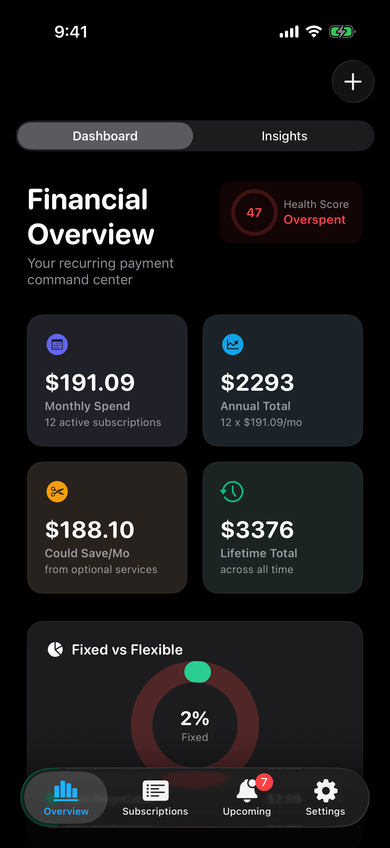
Most subscription apps want to connect to your bank so they can find your charges for you. That connection costs the app maker money every month, so they have to charge you every month to keep it alive.
Outgo skips the whole arrangement. You type in your subscriptions yourself, which takes about fifteen minutes for a normal person's list, and then the app just quietly keeps track. Nothing leaves your device except what you choose to sync through your own iCloud.
A little manual setup beats another forever fee.

Name, amount, billing cycle, category, next bill date, the card it charges, a website, a note, and whether it is a fixed bill or an optional extra. A live preview shows the monthly and yearly cost before you save, and trial mode tracks the end date so a free trial does not quietly become a paid plan.

Search, sort by name, amount, next bill, or category, and filter with a tap. Every charge is shown as a monthly and an annual number, so a yearly renewal stops hiding behind a small-looking price.

Bills are grouped by today, tomorrow, this week, this month, and later, with the total due this week right at the top. Trials that are about to end get their own section, so you can cancel before they charge.
Gentle reminders before charges, before trials end, and when your monthly total passes the budget you set.

Optional services get 1, 3, and 5-year savings projections, with a slider that stretches out to ten years. When you have three streaming services or two cloud plans, Outgo points out the overlap and suggests keeping one.
Three views that use your own numbers to show where the money is actually going.
Six months of recurring spend, so you can see how it grew one sign-up at a time.
Uses your own hourly value of time to decide whether a service is earning its keep.
Puts quarterly and yearly charges in the months they actually land.
A small widget shows your next two upcoming bills, and the medium widget shows three. Settings includes a live preview built from your own data, so you know what it will look like before you add it.


Set a monthly budget goal, pick default reminder timing, build custom categories with their own icons and colors, and switch between light and dark. Export a JSON backup any time, restore from one later, or save a clean PDF report of everything you pay for.
Honest answer: it started as something I built for myself. I had a pile of recurring charges I kept losing track of, I did not want to hand a bank login to yet another company, and I definitely did not want to pay a monthly fee to find out what my monthly fees were.
Once it worked, it seemed silly to put a toll booth in front of it. So there is no subscription, no in-app purchase waiting behind a feature, and no data harvesting paying the bills behind the scenes. It is a small studio tool that I use every week, and I would rather more people have it than squeeze a few dollars out of the ones who find it.
If it helps you cancel one thing you forgot about, that is the whole point.
Outgo never asks for a bank login. You type in what you pay for, and that is all it knows.
Your list can follow you between iPhone, iPad, and Mac through your own iCloud account. Nothing goes through a server we run.
Export a JSON backup or a PDF report whenever you want a copy outside the app.
Yes. Free to download, free to use. There are no in-app purchases, no premium tier, and no ads.
No, and it never asks to. You enter your subscriptions yourself. For most people that is a 15-minute job, and then the app remembers everything.
No. There is no sign-up, no email, and no password. Download it and start adding subscriptions.
On your device, and in your own private iCloud container if you turn on iCloud sync. We do not run a server that stores your subscription data.
Yes. Sign in to iCloud on each device and your list stays in step. If you are not signed in, Outgo still works fine on that device by itself.
None. Nothing to unlock, nothing to upgrade, nothing to dismiss.
Any time. Settings has a JSON export for backups and a PDF report if you want a readable copy. Import brings a JSON backup right back in.
Outgo is free for iPhone, iPad, and Mac. Fifteen minutes of typing, and every recurring charge in your life is in one place.
Free on iPhone, iPad, and Mac. One download, one iCloud account, the same list on every device.
There is a little arcade game hidden in the app for people who poke around. We are not telling you where.